Saturday, March 23, 2013

Determine if Android application is the first time used

Hi,

I am doing some Android application, and I need to determine if my Android application is used for the first time. So here, I will explain two ways how to solve this problem.

First way is to check if exists some empty file.

String path = Environment.getExternalStorageDirectory().getAbsolutePath() +
 "/Android/data/myapplication/files/emptyfile.txt";

boolean exists = (new File(path)).exists(); 

if (!exists) {
    //do something                                 
}
else {
    //do something
}

Okey, this way seems the most obvious, but there is better way to do this. You can check if Android application is used for the first time with SharedPreferences.

final String PREFS_NAME = "MyPrefsFile";

SharedPreferences settings = getSharedPreferences(PREFS_NAME, 0);

if (settings.getBoolean("my_first_time", true)) {
//the app is being launched for first time, do something        
// record the fact that the app has been started at least once
    settings.edit().putBoolean("my_first_time", false).commit(); 
}

Monday, February 18, 2013

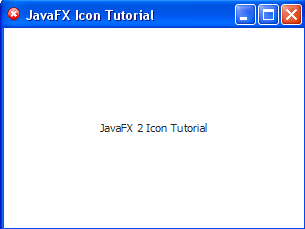
JavaFX 2 Application Icon

In this short and easy JavaFX tutorial, I will explain how to set JavaFX 2 icon for your application. Okey, you might wonder why I need tutorial for something that is so easy. Well, I am writing this article because I will use this as a reminder, if I ever need this.

You can find any icon for your JavaFX 2 application here on http://www.iconfinder.com.

JavaFX 2 Icon
JavaFX 2 Icon

JavaFX 2 Application Icon code


Thursday, January 24, 2013

Droid.ba - BIH Android zajednica

Droid.ba je Android portal za Bosnu i Hercegovinu (BIH). Ovo je informativni sajt na kojem ćete moći dobiti najnovije vijesti iz Android svijeta, recenzije, i različite vrste uputstava i zanimljivosti. Cijeli ovaj projekat je zamišljen da bude zajednica korisnika Android uređaja. Ukoliko imate Android telefon ili tablet, onda bi ovo moglo biti idealno mjesto za Vas, jer biste ovdje mogli naći najnovije vijesti, android aplikacije, i sve ono što je potrebno za Vaš Android uređaj.

Prati Droid.ba na društvenim mrežama:


Link stranice: www.droid.ba


android bosna i hercegovina
Droid.ba - BIH Android zajednica


Wednesday, December 12, 2012

Android aplikacija: Auto Oglasi

Aplikacija "Auto Oglasi" je namijenjena svakome ko želi da proda ili kupi automobil na što jednostavniji i brži način. Na veoma jednostavan način ova aplikacija vam pomaže da pronađete nov ili polovan automobil koji se prodaje blizu vas, ili da Vi prodate svoj automobil posredstvom vašeg Andorid telefona. Ono što vam treba jeste Android, pametni telefon i Internet konekcija. 
Sama ideja aplikacije je da korisnici u svakom trenutku, i svako vrijeme mogu pregledati (putem Android telefona ili tableta) oglase autmobila koji se prodaju, pa i da dodaju novi oglas. Aplikacija omogućava pregled oglasa, dodavanje oglasa, i pretraživanje po različitim kriterijuma (npr. proizvođač, cijena, godište, tip, potrošnja goriva i slično). Pored toga aplikacija omogućava i snimanje oglasa u "Omiljeno", kako bi korisnici onaj oglasi koji im se svidi mogli kasnije pregledati i kada nemaj pristup Internetu, tj kada su offline. Onog ko postavi oglas na osnovu njegovih kontakt informacija je moguće direktno iz aplikacije pozvati, poslati SMS poruku ili poslati e-mail. Trenutno, postoji saradnja sa www.mobile.ba, u smislu preuzimanja najzanimljivjih oglasa sa njihovog sajta, i dijeljenja istih u ovoj aplikaciji, ali naravno to ne sprečava i ostale korisnike da ukoliko oni prodaju svoj automobil, da i oni naprave oglas u aplikaciji i podijele ga sa ostalim ljudima.
Link ka aplikaciji: Aplikacija je dostupna na Google Play.

Nekoliko prikaza ekrana:


Tuesday, September 11, 2012

WordFix Review

What is WordFIX?
WordFIX is a data recovery software that restores corrupt or damaged Microsoft Word files. WordFIX repairs damaged Word files from all versions of Microsoft Word. It's developed by Cimaware company, specialized for software that repairs and restores corrupted or damaged files. Since Microsoft Word is the most used of all the Microsoft Office tools, it's logically that the most of the failures happen with Word, so this WordFIX is also the most used repair software.
WordFIX

What does WordFIX solve problems?

  • Word shows an error and does not allow you open the file.
  • You can open your Word file but it shows errors or does not work properly.

Summary

  • WordFIX quickly recovers the data from any Microsoft ® Word file that shows errors when opening.
  • It is the only one that instantly recovers texts, images, tables, fonts, styles, paragraph and page formatting, table of contents, glossaries, hyperlinks, favorites, charts, and non-western characters.
  • The recovery of Word files is done in your own computer in only a few seconds, safely and confidentially.
  • For Microsoft ® Word 95, 97, 2000, 2002 (XP), 2003, 2007 and 2010.


Saturday, September 1, 2012

How to deactivate Facebook account?

If you want for some reason, you can easily deactivate your Facebook account. Deactivating your account will disable your Profile and remove your name and picture from most things you've shared on Facebook. Some information may still be visible to others, such as your name in their friends list and messages you sent.
-->

If I deactivate my Facebook account can I reactivate it?
Yes, you can, because if you deactivate your account you will not delete it permanently.

I want to delete it permanently how I can do it?
If you want to delete your Facebook account permanently click HERE.

Anyway if you want just to deactivate for some time, please follow this tutorial below:

  1. Click on the small triangleat the top right hand corner of the page and then select the option that says “Account Settings" as shown on the image on the right. 
  2. Now select the option that  says "Security".
  3. Click on "Deactivate your account".
These last two steps are shown on the image below with the red line.


UPDATE: Check out few more Facebook articles:

Thursday, August 30, 2012

How to delete Facebook account?

A, lot of users don't know how to delete permanently Facebook account, so they just deactivate it. If you deactivate your account, your timeline disappears from the Facebook service immediately. People on Facebook won't be able to search for you, though some info, like messages you sent, may still be visible to others. Anyway, anytime you want, you can easily back to the Facebook, by just entering your log in information.

If you only want to deactivate your account for some time, and don't want delete it permanently then check tutorial how to deactivate your facebook account.

-->
If you don't think you'll use Facebook again, you can request to have your account permanently deleted. Please keep in mind that you won't be able to reactivate your account or retrieve any of the content or information you've added.  Then, if you'd like your account permanently deleted with no option for recovery, follow this tutorial below:


  1. Click on this link to start deleting your Facebook account:  https://www.facebook.com/help/delete_account
  2. Then click on "Delete my Facebook" button as shown on the image below.

  3.  Facebook will ask you to verify your password and submit a security check as shown on the image.

And that's all, your account has been deactivated from the site and will be permanently delete within 14 days. If you log into your account within the next 14 days, you will have the option to cancel your request.


Saturday, June 30, 2012

Top 5 JavaFX 2 Tutorials for June 2012

This month was pretty busy for me, I wrote a lot of JavaFX tutorials and few other  articles. I  had a lot of visits this month on this blog. So, I decide to share top 5 JavaFX 2 tutorials for this month.


1. BOOK REVIEW: JavaFX 2 Introduction by Example

This was the most popular article on the blog for this month. A lot of people read the article and bought the book. If you are interested in learning JavaFX 2, then this book is a good place to start, because you will be able to into JavaFX 2 quickly and fast as possible. You can read the full article by clicking on the image, or clicking HERE.


2. JavaFX 2 UI Controls: List View

This was tutorial about JavaFX 2 ListView, and here I also explained  how to implement basic onMouseClicked Event Handler.

3. JavaFX 2 Styling Text with CSS

In this tutorial I am styling three text nodes, so it's tutorial about how to style text with JavaFX 2 and  CSS.
In order to create text like this I experimented with Drop Shadow and linear and gradients. You can check the full tutorial HERE.


4. Getting Started with JavaFX 2 in Eclipse IDE

This was the first tutorial on the blog, and interesting fact is that is still very popular after more than month and a half. So, if you want to start developing JavaFX 2 applications, then this is the tutorial for you.

5. JavaFX 2 Create Dialog with Stage

It's logical that this tutorial is in the top 5, because this is a pretty useful stuff. Almost every application need some additional window (stage). As you can see there is a button, and when user click on that button I will create and open a new dialog. You can check the full tutorial HERE.