Showing posts with label JavaFX 2 Stage. Show all posts

Sunday, June 10, 2012

JavaFX 2: Transparent Stage

In this tutorial I am going to create a transparent Stage (window) with JavaFX 2, this means that the application won't have a window around the image.  In order to make Stage transparent we need to set StageStyle.TRANSPARENT. Also, I wanted here to add little close image, because I want to allow user to close application. Below you can take a look how our application will look in the end.

 You can use any image that you like for background, but I used this one: Background Image, and here you can download "close" image.


Tuesday, June 5, 2012

JavaFX 2: Create a new Dialog on the same Stage

In this tutorial I am going to modify a little bit previous tutorial about How to create a new Dialog with Stage. Instead of opening a new dialog on the new Stage, here we'll open a dialog on the same Stage. That might be useful, in some cases.
Check this video below to see how our example will look in the end.


Here is the code:

Only modification from previous tutorial about JavaFX 2: Create Dialog with Stage is shown below:


As you can see, I've just created a new Scene and added it to primaryStage.

Saturday, June 2, 2012

JavaFX 2: Create Dialog with Stage

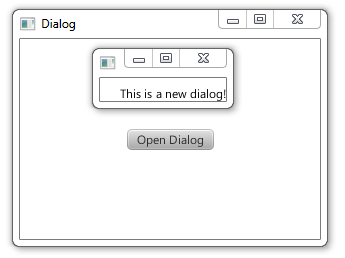
This is JavaFX tutorial about creating a new dialog with Stage. This will be a very short example, and as you can  look below,  this is  how our little example will look in the end. As you can see there is a button, a when user click on that button I will create and open a new dialog, simple like that.

-->
This is just a demonstration example. In that new dialog you can create a lot of cool and useful things if you know how to work with JavaFX 2 layouts.


Check other tutorials from JavaFX Layout series by clicking on the image above.
javafx 2 layout

If you still have problems with creating Java project for JavaFX 2.0 in Eclipse IDE, click on the image below.


javafx 2